
Litera Compare

Litera Compare
Fast and accurate document comparison software. Litera Compare accurately detects changes across any two documents in seconds. At home or on the go, use this market-leading comparison solution to compare entire documents or only snippets from Outlook, the document and case management systems, or directly within the file.
Litera Compare helps you focus on what matters.
The time it takes to manage revisions from multiple authors in multiple document formats can become a serious cost issue, not to mention error-prone when spotting changes by eye. See how Litera Compare helps you compare with confidence.
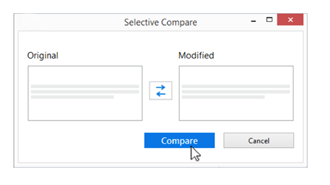
See Changes in Entire Documents or Snippets
Compare everything or only pieces of text or code, or you can compare two images, tables, charts, comments – any content really.
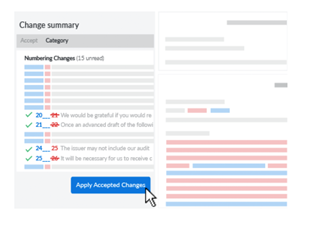
Review a Comprehensive Change Summary
Get a wholistic analysis of every changed element within your document in a layout that is easy to understand. The comparison analysis is structured by change type and quantity, helping you filter results and quickly modify or flag for later.

Save & Share Your Comparisons
Save the redlines, a merged version, or create a new document with the original formatting that reflects combined changes, then print or email.
What Others Say About Litera Compare
Lawyers and Support Teams Work Faster & More Effectively
"Document comparison is an essential part of the work carried out by both lawyers and their support teams-decreasing the amount of time spent comparing documents enables the team to process documents faster, turn around work for lawyers quicker and it helps to deliver great client service while keeping them happy."
--David Bullock
Ward Hadaway
Corporate Legal Teams CompareDocuments with Ease
"I'm extremely pleased with this product, because it helps make comparing documents fast and easy."
--Paige Henney
Zachary Construction Corporation
Document Comparison Integration Fuels Innovation
"We're impressed by how simple Litera has made it for us to integrate valuable document comparison info our flagship systems, and we are particularly excited about the opportunity it creates to enhance the experience for the external users our clients invite to collaborate in the HighQ platform."
--Stuart Barr
Chief Product & Strategy Officer at HighQ
Frequently Asked Questions
-
Is this a subscription purchase?
Yes. Each license purchased is for a one-year subscription (365 days). For your convenience, subscriptions automatically renew. To opt-out, please update your renewal setting within your Order in the Account section of the store. -
What operating systems are compatible with Litera Compare?
Litera Compare runs on machines with Microsoft Windows operating system. If you have a Mac with a MacOS or a machine with a Linux operating system, Litera Compare is only compatible if you have a dual boot, or virtual machine, running with a Windows Operating system. If you are not sure what operating system you are using, please contact your system administrator. -
What options are available if I don't have a Windows operating system?
If you do not use a Microsoft Windows operating system and are unable to host a virtual machine with it, please refer to the Litera Compare Office 365 app. Litera Compare Office 365 app is a device-agnostic, cloud-based tool set that allows you to compare, clean, and convert documents, spreadsheets, and presentations from anywhere. -
I am only able to purchase 10 licenses through the store. What if I need more?
While online purchases are limited to 10 seats, more are available for your organization. Please contact us with your company name, product request, and quantity needed and we will gladly work with you to get the licenses you require. - I already have licenses for Litera Compare and would like to add more for my organization. Can I purchase through the store? To add licenses when you are mid-subscription term, please contact our sales person.
-
Once my purchase is confirmed, how do I receive the product?
Once your order has been processed, you will receive an email to create or log in to your account within the Litera Customer Center. Your downloads and license keys will be available within your account. Note: You might have to check your SPAM or JUNK email folder. If you do not receive the email within four hours, contact Customer Support. -
I have a different version of Litera Compare. Can I renew what I have?
Litera Compare is the recently updated comparison solution combining all previous Litera Compare versions and their best functionalities. To provide you with the best value and allow for us to best serve you, all renewals of Litera Compare products will now be Litera Compare; previous versions of Litera Compare are not available for renewal. -
How does each user install Litera Compare?
After your purchase is complete, you will receive an email with instructions on how to access your download and license keys. You can also find guides on how to install Litera Compare on the Customer Center. -
Once I purchase, how can I contact Litera Microsystems if I need additional support?
For self-help, you may access the Customer Center. for a library of articles, documentation, training materials, and more on Litera Compare. For hands-on support, feel free to email Customer Support. - Which Operating Systems are supported
Operating System:
Microsoft Windows 10 (32 bit and 64 bit)
Microsoft Windows 8.1 (32 bit and 64 bit) + Japanese
Microsoft Windows 7 SP1 (32 bit and 64 bit) + Chinese Simplified & French
Citrix:
With Microsoft Windows Server 2012 R2 or 2016 (64 bit)
Citrix XenApp 7.5
Citrix XenDesktop 7.5
Microsoft Office System
Microsoft Office 365 (desktop) (32 bit)
Microsoft Office 2019 (32 bit) – including click-to-run
Microsoft Office 2016 (32 bit) – including click-to-run
Microsoft Office 2013 SP1 (32 bit) + Japanese – including click-to-run
Email System
Microsoft Outlook 365 (desktop) (32 bit)
Microsoft Outlook 2019 (32 bit)
Microsoft Outlook 2016 (32 bit)
Microsoft Outlook 2013 SP1 (32 bit) + Japanese
IBM Notes 9.0.1 FP7, FP8 and FP9
Browsers
Microsoft Edge, latest version
Microsoft Internet Explorer 11
Google Chrome, latest version
Mozilla Firefox, latest version
Microsoft SharePoint
Microsoft SharePoint 2013 SP1
DMS Integration
NetDocuments
iManage:
Work 10 Desktop for Windows 10.0 and above
Work 10 web client
FileSite/DeskSite 9.0 Update 6 and above
OpenText:
eDOCS DM 16.5
eDOCS DM 10
eDOCS DM 5.3.1 COM only (Patch 6)
Worldox:
GX4
